ubFlow Documentation¶
Software in safety-critical systems — automotive (ASPICE, ISO 26262), aerospace (DO-178C), or medical (IEC 62304) — is developed under strict process obligations: bidirectional traceability, peer reviews with explicit disposition, configuration baselines, tool qualification, and audit trails. These obligations apply equally whether a human engineer or an AI agent produces the artifact.
ubFlow is a needs-driven agent design system for GitHub Copilot. It provides the infrastructure to build, deploy, and operate AI agents that are natively compliant with regulated development processes:
Every agent rule is traceable — instructions are derived from Sphinx-Needs specifications and linked back to their motivating requirements.
Every agent action is auditable — execution records capture prompts, tool calls, and touched artifacts for ASPICE SUP.8 / ISO 26262 tool qualification.
Every output passes a review gate — structured Sphinx-Needs review objects, linked by content hash, provide the same evidence as a traditional peer review.
Domain knowledge is packaged as agent families — a single install brings all instructions, skills, and process knowledge required for a given domain (e.g., ASPICE SYS/SWE) into the project’s own documentation.
The result is an agentic development workflow where the AI is not a black box but a qualified, traceable contributor — one whose work can be assessed, approved, and integrated with the same rigour expected of any human engineer on the team.
Warning
This Agentic worklfow and the tools are under heavy development and some parts are just concepts yet. Current project status is alpha.
Agent instructions loaded live from Sphinx-Needs docs — full traceability to requirements, as mandated by ASPICE, ISO 26262, and DO-178C.
Deploy domain-specific agent sets (e.g., ASPICE SYS/SWE) into your project with a single command. Each family is independently customizable.
Run parallel agentic proposals, compare outcomes, and merge only the approved result — aligned with ASPICE CHG.1 baseline management.
Automated rubric-based quality scoring for any Sphinx-Needs object — configurable per need type with adjustable thresholds.
Full audit record per run — prompts, tool calls, and touched artifacts, ready for ASPICE SUP.8 / ISO 26262 tool qualification.
Reviews are Sphinx-Needs objects cryptographically linked to the exact artifact version — machine-generated, human-approved, standards-compliant.
Gate-driven V-model workflows — reviewed output of one step becomes the controlled input to the next, per ASPICE and DO-178C phase gates.
Agents query a structured knowledge graph built from framework and project documentation. Focused retrieval delivers exactly the right context.
A compact metamodel mapping agent artifacts to standard-required work products in ASPICE, ISO 26262, IEC 62304, and DO-178C.
Core concept: Traceable, on-the-fly Agent instructions¶
Status: Implemented
Agents obtain their instructions directly from the Sphinx-based project documentation, which allows to have the full traceability between agent instructions and their motivation in terms of requirements and specifications. Bi-directional traceability between requirements, design, and verification artifacts is a mandatory obligation in regulated domains — ASPICE (SWE.1–SWE.6), ISO 26262-8 §6, IEC 62304 §5.7, and DO-178C §11 all require it explicitly.

The above image shows a CoPilot prompt answer snippet with Sphinx-Needs references for instructions and skills. It is referencing Always detect the repositor... (FLIN_UBFLOW_INST_002) and Detect repository root and ... (FLSK_UBFLOW_INST_001).
This works by letting the ubFlow agents read their instructions via ubCode MCP from the Sphinx-Needs project:
        flowchart LR

user(User)
copilot(CoPilot)
agent(agent.md)
ubcode(ubCode MCP)
subgraph docs["Project documentation"]
   inst(Instruction<br> & skills)
   req(Requirements)
   code(Source Code)
end

inst -. links .-> req
code -. links .-> req

user -- 1. asks --> copilot
copilot -- 2. reads --> agent
copilot -- 3. asks --> ubcode --  4. collects --> inst
inst -- 5. enhances agent --> copilot
copilot -- 6. works on --> req
copilot -- 7. works on --> code
copilot -- 8. asks for approval --> user
A single agent instructions looks like this in the project documentation:
.. flowinst:: Always print need IDs in full and link to their source
   :id: FLIN_UBFLOW_001
   :status: draft
   :tags: ubflow
   :implements: FLSP_UBFLOW_001; FLSP_UBFLOW_002

   Whenever a need ID (instruction, skill, specification, flow story, agent,
   or tool) is mentioned in any output or explanation, always use the full,
   unabbreviated identifier. Never shorten IDs. [...]
And the traceability of such an instruction looks like:
![@startuml
' Nodes definition
node "<size:12>Flow Inst</size>\n**Always print**\n**need IDs in**\n**full and link**\n**to their source**\n<size:10>FLIN_UBFLOW_001</size>" as FLIN_UBFLOW_001 [[../core/shared/flow_instructions.html#FLIN_UBFLOW_001]] #06B6D4
node "<size:12>Flow Spec</size>\n**Need IDs**\n**rendered with**\n**an inline**\n**source link**\n<size:10>FLSP_UBFLOW_002</size>" as FLSP_UBFLOW_002 [[../core/shared/flow_specs.html#FLSP_UBFLOW_002]] #8B5CF6
card "<size:12>Flow Story</size>\n**Full need ID**\n**display with**\n**source links**\n<size:10>FLST_UBFLOW_035</size>" as FLST_UBFLOW_035 [[../core/shared/flow_stories.html#FLST_UBFLOW_035]] #3B82F6
node "<size:12>Flow Spec</size>\n**Full need ID**\n**output — no**\n**abbreviation**\n<size:10>FLSP_UBFLOW_001</size>" as FLSP_UBFLOW_001 [[../core/shared/flow_specs.html#FLSP_UBFLOW_001]] #8B5CF6
' Connection definition
FLIN_UBFLOW_001 --> FLSP_UBFLOW_001
FLIN_UBFLOW_001 --> FLSP_UBFLOW_002
FLSP_UBFLOW_002 --> FLST_UBFLOW_035
FLSP_UBFLOW_001 --> FLST_UBFLOW_035
@enduml](_images/plantuml-05728965aef8174f4668a8f142ba6a79216ba020.svg)
The rst command for such a traceability view of an instruction is:
.. needflow::
   :root_id: FLIN_UBFLOW_001
   :root_depth: 2
   :root_direction: outgoing
Always-Load Rules — resilient instruction delivery¶
Status: Implemented
The MCP bootstrap that loads an agent’s instructions at session start is the primary delivery channel — but it can fail: the ubCode extension may not yet be installed, the index may be stale, or the session may have started before the bootstrap completed.
For the majority of instructions this is acceptable: they will be loaded on the first explicit action. A small number of meta-rules, however, must be available unconditionally — rules about transparency, citation of driving instructions, and maintenance of the instruction set itself. A session that progresses without these rules produces output that is hard to audit and may silently violate process obligations.
The always-load tag solves this. Any FLIN_ or FLSK_ tagged
always-load is mirrored as a one-line entry in the
## Always-Active Rules section of .github/copilot-instructions.md.
Because that file is loaded automatically by GitHub Copilot on every session
start — before any MCP call — the rules it contains are always in effect.
Key properties:
Self-maintaining —
FLIN_UBFLOW_018requires theAlways-Active Rulestable to be updated immediately whenever analways-loadneed is created or modified.Minimal footprint — only genuinely session-critical rules receive the tag; the copilot-instructions.md stays concise.
Traceable — every entry in the table links to a fully-specified
FLIN_orFLSK_need with aFLSP_andFLST_chain.
ubFlow based Agent Families¶
Status: Implemented
To support comprehensive workflows in system and software development, multiple specialized agents are required. While these agents share common rules, each is tailored for distinct tasks. ubFlow streamlines the creation and management of agent families by providing standardized mechanisms and domain knowledge for their development and integration.
An agent family is installed into the user’s documentation project and repository, providing all definitions, data, and tooling required for operation. This enables independent, project-specific customization of agent behavior.
The family model directly reflects how regulated projects are structured: ASPICE mandates separate process areas for system requirements (SYS.2), software requirements (SWE.1), architecture (SWE.2), and testing (SWE.4–SWE.6) — each with defined work products and entry/exit criteria. Equivalent role separations exist in DO-178C and IEC 62304.
        flowchart LR

user(User)
subgraph ubcode["ubCode"]
   ubflow(ubFlow)
   subgraph ubflow_docs[Docs & Traceability]
      ubflow_common(ubFlow Common Knowledge)
      ubflow_aspice(ubFlow ASPICE Family)
   end

end

subgraph github["github Config"]
   agent0(ASPICE Orchestration)
   agent1(Agent SYS.2)
   agent2(Agent SWE.1)
   agent3(Agent ...)
end

subgraph project["Project Docs"]
   docs(Documentation)
   process("Process Artifacts<br>(Reqs,Specs,Test cases)")
   inst("Agent<br>Instructions")
   skills("Agent<br>Skills")

   inst  -- links --> process
   skills  -- links --> process
   linkStyle 0,1 stroke:#d4ff3e,stroke-width:2px, stroke-dasharray:5 5
end

user -- "1. Create and install ASPICE agents" --> ubflow
ubflow_common -- 2. Retrieve needed<br>agent information --> ubflow
ubflow_aspice -- 3. Retrieve needed<br>ASPICE information --> ubflow
ubflow -- 4. Install instructions --> inst
ubflow -- 5. Install skills --> skills
ubflow -- 6. Update process artifacts --> process
ubflow -- 7. Install agent definitions --> github


agent1 -. uses .-> inst
agent1 -. uses .-> skills


classDef ub_new stroke:#d4ff3e,stroke-width:2px,color:#fff
classDef ub_update stroke:#d4ff3e,stroke-width:2px,color:#fff,stroke-dasharray: 5 5
classDef ub fill:#d4ff3e,color:#333
class inst,skills,agent0,agent1,agent2,agent3 ub_new
class process ub_update
class ubflow ub
ubFlow Change branches¶
Status: Prototype
ubFlow separates agent work by integrating results only after thorough reviews and approvals. By supporting change proposals, multiple agentic runs with similar configurations can be executed in parallel, enabling comparison of outcomes and selection of the optimal result for final integration. This directly implements the change-request lifecycle required by ASPICE CHG.1 and the configuration baseline management of ISO 26262-8 §7 and DO-178C §7: parallel proposals are developed in isolation, reviewed, and only then merged into the controlled baseline.
        gitGraph

   commit
   commit
   branch change_x
   commit id: "Change description"
   checkout main
   commit id:"Other change 1"
   checkout change_x
   branch change_x_arch_proposal_1
   commit id: "Arch change"
   commit id: "Change memory update"
   commit id: "Arch reviews"
   checkout change_x
   merge change_x_arch_proposal_1 id:"Arch Proposal merge"
   branch change_x_sw_proposal_1
   branch change_x_sw_proposal_2
   checkout change_x_sw_proposal_1
   commit id: "SW change 1" type: REVERSE
   checkout change_x_sw_proposal_2
   commit id: "SW change 2"
   commit id: "Change memopry update 2"
   commit id: "SW reviews 2" type: REVERSE
   checkout main
   commit id:"Other change 2"
   checkout change_x
   branch change_x_sw_proposal_3
   commit id: "SW change 3"
   commit id: "Change memopry update "
   commit id: "SW reviews"
   checkout change_x
   merge change_x_sw_proposal_3 id:"SW Proposal merge"
   checkout main
   commit id:"Other change 3"
   merge change_x id:"change_x merge"
   commit
Quality assurance for Sphinx-Needs objects¶
Status: In Progress
ubFlow embeds a quality agent that evaluates Sphinx-Needs objects against defined quality criteria — regardless of whether the object belongs to ubFlow itself or is a project-specific artifact such as a system requirement or software specification.
Quality checks are based on a weighted rubric: each category yields a score and an improvement proposal; the aggregated result is a single overall quality score. Criteria are configurable per Sphinx-Needs type, support project-specific measurement rules, and allow threshold adjustment per project context.
By default, ubFlow Quality agents checks for:
Clarity & wording
Atomicity
Context & Conditions
Measurability / Acceptance Criteria
Testability
Interfaces & Data (I/O)
Safety / Risk / Degradation (ADAS)
Solution Neutrality
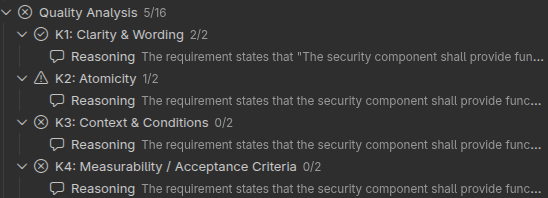
Example result of a quality check for one object. Presented in the ubCode Needs Tree.¶
Agent usage tracking and reporting¶
Status: Open
In safety-critical and regulated projects, an AI agent is a development tool in the sense of functional-safety standards such as ASPICE or ISO 26262 — and like any tool, it must be qualified and its usage must be auditable. Without a structured record of what the agent did, which instructions it followed, and which artifacts it produced or modified, neither process compliance nor tool qualification can be demonstrated.
ubFlow captures a full execution record for every agentic run:
Prompt and agent configuration — exact instruction set and parameters in effect at execution time
Tool calls with inputs and outputs — every MCP query, file read, and external API call
Touched artifacts — all files and need objects created or modified
This audit trail directly supports three compliance objectives:
Process compliance — demonstrate that prescribed development steps were executed and traceable to project artifacts
Tool qualification — provide the evidence required by standards such as ASPICE SUP.8 or ISO 26262 Part 8 to qualify the AI agent as a trusted development tool
AI transparency — automatically mark commits and pull requests as AI-assisted, enabling downstream review and accountability
ubFlow collects this data transparently, with no instrumentation effort required from the user, by leveraging the VS Code Copilot OpenTelemetry support:
        sequenceDiagram

Participant User
Participant ubFlow
Participant CoPilot


box darkgreen Agent stuff
   Participant Agent
   Participant ubCode MCP
   Participant File X
   Participant Tool A
   Participant Subagent
end

User->>CoPilot : Invokes agent
CoPilot->>ubFlow: Starts on-the-fly reporting<br> via OpenTelemetry
par Agent actions
   CoPilot->> Agent: Executes Agent
   Agent<<->>ubCode MCP: Gets Instructions
   Agent<<->>File X: Changes file
   Agent<<->>Tool A: Calls tool
   Agent<<->>Subagent: Triggers a subagent
end
ubFlow ->> ubFlow: Analyses Agent events
ubFlow ->> User: Presents usage report
Scoped Agent Environment¶
Status: Open
Agents execute inside a controlled environment whose boundaries are defined entirely by Sphinx-Needs objects in the project documentation. Three mechanisms enforce this scope:
Dev Container — a declarative container definition pins the exact toolchain, extensions, and MCP servers available to the agent. No tool outside the declared set can be invoked.
VS Code Settings — workspace settings restrict the active MCP servers to the project-approved list. No undeclared server endpoint is exposed to the agent.
ubCode MCP Server — server-side access control ensures that only features explicitly enabled in the project’s Sphinx-Needs configuration are surfaced. Agents cannot query or modify data outside their designated scope.
This containment is paired with the agent usage tracking and reporting capability: adherence to the scoped environment can be verified and demonstrated as part of a tool-qualification audit trail, as required by ASPICE SUP.8 and ISO 26262-8 §11.
Sphinx-Needs based Review concept¶
Status: Open
Documented peer reviews with explicit disposition are a mandatory verification activity in regulated development — required by ASPICE SWE.3/SWE.4, ISO 26262-6 §8, IEC 62304 §5.5, and DO-178C §11.9. Traditionally, these are separate review documents with manual author signatures tied to a specific document version. ubFlow agents document reviews as Sphinx-Needs objects, hard-linked to the exact artifact version via content hash — providing equivalent evidence automatically.
Example:
.. req:: Park Assist distance range
   :id: REQ_PARK

   The park assist must work in the range of
   50cm down to 5cm.

.. review:: Functional Review
   :by: Max Mustermann
   :for: REQ_PARK[hash=ADEF3]
   :status: change_required

   The max. distance is too low, it must be at least 200cm

.. review:: Agentic Quality Review
   :by: Quality Agent
   :for: REQ_PARK[hash=ADEF3]
   :status: change_required

   The requirement is not atomic.
   It should be split into two requirements, one
   for max and one for min distance.

.. review:: Testing team
   :by: Peter Tester
   :for: REQ_PARK[hash=ADEF3]
   :status: approved

   All good, can be tested.
Processes description for humans and agents¶
Status: Open
In regulated development, a process is not just documentation — it is a contract: it defines what steps must be performed, in what order, by whom, and with what entry and exit criteria. Both human engineers and AI agents must understand this contract to act correctly inside a complex process landscape.
ubFlow represents process knowledge as first-class Sphinx-Needs objects. Process definitions, phases, activities, roles, and work products are all structured, queryable, and traceable — not buried in unstructured text. Agents query these objects at runtime via the ubCode MCP server, giving them precise, up-to-date process context without prompt engineering overhead.
Key capabilities:
Process phases — define lifecycle phases (e.g., requirements, architecture, testing) with entry and exit criteria, responsible roles, and linked work products.
Process activities — break phases into discrete, actionable steps. Each activity carries a description, inputs, outputs, and the agent or role responsible.
Work products — declare the expected artifacts (documents, models, code) produced or consumed by each activity, and link them to Sphinx-Needs requirements.
Role assignments — specify whether a step is performed by a human engineer, an AI agent, or both — enabling hybrid human/agent workflows.
Traceability to instructions — every agent instruction (
FLIN_) and skill (FLSK_) can be linked to the process activity it implements, providing end-to-end traceability from process obligation to agent behaviour.
Optimized workflows¶
Status: Open
Combined with the review concept described above, each agentic workflow step is optimized for concise, quality-driven execution. Reviews serve both as validation and as gatekeepers: the output of one agent becomes the input for the next. Review tasks are performed in parallel by human engineers and agentic AI, ensuring robust and efficient quality assurance. This gate-driven structure mirrors the V-model entry/exit criteria of ASPICE and the phase-review requirements of ISO 26262 and DO-178C: the verified output of one process step becomes the controlled input to the next.
        flowchart TD

prompt("User prompt")
prompt -- triggers --> agent1
agent1 -. requests update .-> prompt

subgraph a1["Agentic Step 1"]
   agent1("Agent 1")
   agent2r("Agent 2 Review")
   result1("Agent 1 Result")
   reviews1("Reviews 1")
   eng("Engineer")


   agent1 -- produces --> result1
   result1 -- requests reviews --> eng
   result1 -- requests reviews --> agent2r
   eng -- creates --> reviews1
   agent2r -- creates --> reviews1
   reviews1 -. requests changes .-> agent1
end

subgraph a2["Agentic Step 2"]
   agent2("Agent 2")
   result2("Agent 2 Result")
   agent3r("Agent 3 Review")
   reviews2("Reviews 2")
   eng2("Engineer")

   reviews1 -- triggers --> agent2
   agent2 -- produces --> result2
   result2 -- requests reviews --> eng2
   result2 -- requests reviews --> agent3r
   eng2 -- creates --> reviews2
   agent3r -- creates --> reviews2
   reviews2 -. requests changes .-> agent2
end

classDef ag1 fill:#d4ff3e,color:#333
classDef ag2 fill:#3ed43e,color:#333
classDef ag3 fill:#d43e3e,color:#333

class agent1,result1,reviews1 ag1
class agent2,result2,reviews2,agent2r ag2
class agent3r ag3
Project- and Workflow-specific Support Chatbots¶
Status: In Progress
ubFlow equips agents with structured access to framework documentation (Sphinx, Sphinx-Needs) and project-specific content. It indexes and classifies the available documentation so that agents can retrieve precisely the knowledge relevant to a given task — without noise from unrelated content.
The underlying knowledge graph is built from multiple source layers and made queryable via the ubCode MCP server:
        flowchart LR

subgraph sources["ubFlow Knowledge Sources"]
   sphinx("Sphinx &<br>Sphinx-Needs Docs")
   ubflow_docs("ubFlow<br>Documentation")
   project("Project<br>Documentation")
   proc("Process Artifacts<br>(Reqs, Specs, Tests)")
end

subgraph kg["Knowledge Graph (ubCode)"]
   index("Indexed &<br>Classified Content")
end

subgraph agents["Agents"]
   agent1("Agent A")
   agent2("Agent B")
end

sphinx --> index
ubflow_docs --> index
project --> index
proc --> index
index -- "focused query<br>via MCP" --> agent1
index -- "focused query<br>via MCP" --> agent2
Documentation model¶
Status: Implemented
The Sphinx-Needs object model used by ubFlow has the following elements:
Flow Story (
FLST_): Describes the motivation of an agentic featureFlow Spec (
FLSP_): Describes the technical realisation of a flow story.Flow Inst (
FLIN_): A set of instructions for the final agent, related to the flow spec.Flow Skill (
FLSK_): A specific process and tool description for a specific problem.Flow Tool (
FLTL_): A tool or script description, which can be used by an agent.
The need types map to standard-required work products: Flow Stories → stakeholder needs (ASPICE SYS.1 / ISO 26262-3 / IEC 62304 §5.2); Flow Specs → software requirements (ASPICE SWE.1 / ISO 26262-6 §6); Flow Insts/Skills → work instructions and process knowledge (ASPICE SUP.8 / ISO 26262-8 §11); Flow Tools → qualified tool descriptions (ASPICE SUP.8 BP6 / ISO 26262-8 §11).
Flow Stories can also be bundled into Epics, which can be used by agents like the Installer to categorize use cases for their work.
        flowchart TD
epic["Epic"] -.-> us["Flow Story"] --> spec["Flow Spec"]

style epic stroke-dasharray: 5 5

subgraph col["Information for Agents"]
   direction LR
   inst["Flow Inst"] --> skill["Flow Skill"] --> tool["Flow Tool"]
end

spec --> col
ubFlow Presentation¶
A concise slide deck for managers and team leads — covering the core concepts and value proposition of ubFlow without deep technical detail.
Table of contents¶
Table of objects¶
ID |
Title |
Type |
|---|---|---|
ubFlow Installer agent |
agent |
|
ubFlow |
agent |
|
Always print need IDs in full and link to their source |
flowinst |
|
Describe every agent rule as a flowinst or flowskill RST directive |
flowinst |
|
Keep flowinst and flowskill strictly separated by what vs. how |
flowinst |
|
Always set :implements: or :supports: link on instructions and skills |
flowinst |
|
Define an agent via a single .. agent:: directive with all required fields |
flowinst |
|
Verify the agent need aggregates all its instructions and skills |
flowinst |
|
Guide the user through agent creation in five confirmed steps |
flowinst |
|
Run only the user-selected review modes when checking an agent |
flowinst |
|
Generate .agent.md as a minimal bootstrap block only |
flowinst |
|
Validate schema at startup and handle missing types contextually |
flowinst |
|
Present an installation plan and wait for confirmation before delegating to the Installer |
flowinst |
|
Never write ubFlow-internal needs into the target project |
flowinst |
|
Place generated .agent.md in .github/agents/ with correct name frontmatter |
flowinst |
|
Generate a plain-language agent summary when requested |
flowinst |
|
Bootstrap full instruction set from ubCode extension on session start |
flowinst |
|
Reference the driving FLIN\_ or FLSK\_ in every decision |
flowinst |
|
Mark meaningful undocumented decisions with (NO FLOW) |
flowinst |
|
Keep copilot-instructions.md in sync with always-load needs |
flowinst |
|
Deploy companion bootstrap instructions file when generating agent files |
flowinst |
|
Always start by loading your instructions from ubCode |
flowinst |
|
Always detect the repository root before asking for a target path |
flowinst |
|
Always verify prerequisites before writing any file |
flowinst |
|
Always detect conflicts before rendering the template |
flowinst |
|
Always resolve the package version from ubflow_package.json, not from git |
flowinst |
|
Always present epic and agent selection before rendering |
flowinst |
|
Always write files atomically and roll back on failure |
flowinst |
|
Always write an installation manifest after a successful installation |
flowinst |
|
Always persist the answers file after a successful installation |
flowinst |
|
Always show a diff and require confirmation before upgrading |
flowinst |
|
Always validate the installed documentation before reporting success |
flowinst |
|
Use the manifest to uninstall — never delete files not listed in it |
flowinst |
|
Always locate the family source by searching repo and extension in order |
flowinst |
|
Always prepare the family source and clean up only what was extracted |
flowinst |
|
Deploy the ubFlow agent stub after every install or upgrade |
flowinst |
|
Deploy companion bootstrap instructions file after every install or upgrade |
flowinst |
|
Render a need ID as a linked source reference |
flowskill |
|
Decide whether content belongs in flowinst or flowskill |
flowskill |
|
Execute the five-step agent creation workflow |
flowskill |
|
Perform syntactic, semantic, and traceability review checks |
flowskill |
|
Query ubCode MCP schema and handle missing types |
flowskill |
|
Cite a driving FLIN\_ or FLSK\_ with a source link |
flowskill |
|
RST and Sphinx directive syntax for common authoring patterns |
flowskill |
|
Author the companion bootstrap instructions file for a ubFlow agent family |
flowskill |
|
Detect repository root and validate target path |
flowskill |
|
Resolve SemVer tags from remote template |
flowskill |
|
Invoke Copier in interactive, replay, pretend, and update modes |
flowskill |
|
Write and verify the installation manifest |
flowskill |
|
Check prerequisites and optionally auto-install |
flowskill |
|
Scan for Sphinx-Needs ID and file-path conflicts |
flowskill |
|
Write files atomically via staging and roll back on failure |
flowskill |
|
Scan installed RST for undefined Sphinx-Needs references |
flowskill |
|
Write the ubFlow agent stub file |
flowskill |
|
Write the companion bootstrap instructions file |
flowskill |
|
Full need ID output — no abbreviation |
flowspec |
|
Need IDs rendered with an inline source link |
flowspec |
|
flowinst and flowskill described as RST directives |
flowspec |
|
flowinst separates what from how |
flowspec |
|
flowinst and flowskill link to a flowspec |
flowspec |
|
agent need as single identity object |
flowspec |
|
agent need as complete aggregation point |
flowspec |
|
Step-by-step agent creation workflow |
flowspec |
|
Agent creation verifies all linked IDs via MCP before writing |
flowspec |
|
Agent review supports three selectable check modes |
flowspec |
|
Traceability review resolves every instruction and skill ID |
flowspec |
|
Minimal bootstrap-only .agent.md |
flowspec |
|
Schema validation at startup with installer-aware fallback |
flowspec |
|
Built-in ubCode MCP knowledge requires no manual setup |
flowspec |
|
Guided project integration with confirmation gate |
flowspec |
|
ubFlow internals never written to target project |
flowspec |
|
ubFlow delivered as ubCode chat participant |
flowspec |
|
ubFlow is non-editable after delivery |
flowspec |
|
Generated agent file placed in .github/agents/ with @-invokable name |
flowspec |
|
Generated agents support delegation from other agents |
flowspec |
|
Human-readable agent overview on request |
flowspec |
|
ubFlow stub contains bootstrap call only |
flowspec |
|
ubFlow fetches its instructions via agent-scoped MCP call |
flowspec |
|
Reference driving instruction or skill in every decision output |
flowspec |
|
Mark meaningful undocumented decisions discretely with NO FLOW |
flowspec |
|
Sync always-load needs into copilot-instructions.md |
flowspec |
|
Use correct RST and Sphinx directive syntax for all authored content |
flowspec |
|
Agent IDs must use a meaningful name segment, never a number |
flowspec |
|
Installer deploys companion bootstrap instructions file per family |
flowspec |
|
Repository root detection |
flowspec |
|
Target folder prompt and validation |
flowspec |
|
Epic enumeration from user-story tags |
flowspec |
|
Epic selection prompt |
flowspec |
|
Epic-filtered template rendering |
flowspec |
|
Deterministic Copier invocation from local source |
flowspec |
|
Installation manifest format |
flowspec |
|
Verify command implementation |
flowspec |
|
Output confinement and folder structure |
flowspec |
|
Package version from ubflow_package.json |
flowspec |
|
Per-agent selection prompt in Copier |
flowspec |
|
Pre-installation dependency check script |
flowspec |
|
Auto-install of Python prerequisites via pip |
flowspec |
|
Update invocation from local package source |
flowspec |
|
Pre-upgrade diff summary from local source |
flowspec |
|
Sphinx-Needs ID collision detection |
flowspec |
|
File path collision detection and per-file confirmation |
flowspec |
|
Uninstall command using manifest |
flowspec |
|
Atomic write with auto-rollback on failure |
flowspec |
|
Copier answers file location and schema |
flowspec |
|
Answers file used for prompt pre-population |
flowspec |
|
Undefined Sphinx-Needs reference scan |
flowspec |
|
Sphinx build as final validation gate |
flowspec |
|
ubflow_package.json schema |
flowspec |
|
Family source discovery (directory or zip) |
flowspec |
|
Family source preparation (directory pass-through or zip extraction) |
flowspec |
|
Installer creates the ubFlow agent stub idempotently |
flowspec |
|
Installer creates the companion bootstrap instructions file idempotently |
flowspec |
|
Guide Agent Creation |
flowstory |
|
Review Existing Agent |
flowstory |
|
Control Review Depth |
flowstory |
|
Verify Traceability Chain |
flowstory |
|
Describe Instructions and Skills in Sphinx |
flowstory |
|
Link Instructions and Skills to Needs |
flowstory |
|
Define Agent as Sphinx-Needs Object |
flowstory |
|
Agent Object Aggregates Instructions and Skills |
flowstory |
|
Agent Bootstraps Itself via MCP |
flowstory |
|
Schema Validation via MCP at Startup |
flowstory |
|
Sphinx Project Integration via Prompt |
flowstory |
|
No Self-Installation into Target Project |
flowstory |
|
ubCode Chat Participant |
flowstory |
|
Read-Only Agent After Delivery |
flowstory |
|
Built-in ubCode MCP Knowledge |
flowstory |
|
Human-Readable Agent Documentation |
flowstory |
|
Agents Callable via Copilot Prompt |
flowstory |
|
ubCode Can Invoke ubFlow Agents |
flowstory |
|
Resolve Target Documentation Project |
flowstory |
|
Validate Documentation Project Scope |
flowstory |
|
Use ubCode MCP to Access Sphinx-Needs Objects |
flowstory |
|
Auto-Install ubCode MCP on Demand |
flowstory |
|
Fixed Execution Workflow for All Agents |
flowstory |
|
Orchestrator Agent per Agent Family |
flowstory |
|
Predefined Workflow Types |
flowstory |
|
Agent Family Management |
flowstory |
|
Define Agent Family as Sphinx-Needs Object |
flowstory |
|
Agent Family Links to Its Member Agents |
flowstory |
|
Orchestrator Is the Family Entry Point |
flowstory |
|
Orchestrator Carries the Family Name |
flowstory |
|
Orchestrator Identifies and Routes Workflow |
flowstory |
|
Orchestrator Enforces the Five-Phase Workflow |
flowstory |
|
Orchestrator Uses ubCode MCP for All Needs Access |
flowstory |
|
Orchestrator Ensures ubCode MCP Is Available |
flowstory |
|
Full need ID display with source links |
flowstory |
|
ubFlow bootstraps its instructions from the ubCode extension |
flowstory |
|
Reference driving instruction or skill in every decision |
flowstory |
|
Mark undocumented decisions with NO FLOW |
flowstory |
|
Guarantee critical rules survive MCP bootstrap failure |
flowstory |
|
Write all agent documentation content in valid RST syntax |
flowstory |
|
Give every agent a meaningful name instead of a number |
flowstory |
|
Deploy companion bootstrap instructions file with every family installation |
flowstory |
|
Installer target location |
flowstory |
|
Installer epic approvals |
flowstory |
|
Epics |
flowstory |
|
Deterministic installation |
flowstory |
|
Single target folder |
flowstory |
|
Template and version selection |
flowstory |
|
Partial agent selection |
flowstory |
|
Prerequisite and dependency check |
flowstory |
|
Update and upgrade |
flowstory |
|
Conflict detection |
flowstory |
|
Rollback and uninstall |
flowstory |
|
Installation configuration persistence |
flowstory |
|
Post-install validation |
flowstory |
|
Local family source bundled with ubCode |
flowstory |
|
Package manifest declaration |
flowstory |
|
Merge ubFlow configuration into existing ubproject.toml |
flowstory |
|
Installer deploys the ubFlow agent stub |
flowstory |
|
Installer deploys the companion bootstrap instructions file |
flowstory |
|
Copier CLI |
flowtool |
|
Git CLI |
flowtool |
|
Sphinx Build |
flowtool |
|
ubCode MCP Server |
flowtool |
|
ubFlow magic-word support in MCP server |
swspec |
|
Agent parameter for MCP need-query functions |
swspec |